In this example, a facility is owned by Foxwood HOA. They allow residents to use the facility for free. They allow the neighboring HOA (Greenside) to use the facility for a discounted rate. They also allow anybody to purchase seasonal memberships. This community will have 3 membership types.
- Foxwood Resident: $0
- Greenside Resident: $200
- Outside Membership: $500
We're using the same example as the previous help article. Steps 1-8 will be exactly the same except the formula used in step #3.
We'll also add the following additional steps.
- Add an error messages if an unknown membership type is detected (Learn More)
- 1 error calculation
- 2 rich text fields
- Guidance to modify your application using #APP_IS_RNEW (Learn More)
GO TO: CONSTANTS TAB
Step 1 (repeat step 1 for each membership type)
Create or confirm the constants that determine each membership type's fee.
- Constant Name:
- We recommend: MEMBER_TYPE_FEE_1
- We recommend: MEMBER_TYPE_FEE_2
- We recommend: MEMBER_TYPE_FEE_3
- Value (enter the fee):
- In this example, we entered: 0
- In this example, we entered: 200
- In this example, we entered: 500
- Description
- We recommend: Enter the fee if the 1st membership type is selected.
- We recommend: Enter the fee if the 2nd membership type is selected.
- We recommend: Enter the fee if the 3rd membership type is selected.
Step 2 (repeat step 1 for each membership type)
Create or confirm the constants that sets each membership type's name.
- Constant Name:
- We recommend: MEMBER_TYPE_NAME_1
- We recommend: MEMBER_TYPE_NAME_2
- We recommend: MEMBER_TYPE_NAME_3
- Value (enter the names):
- In this example, we entered: "Foxwood Resident"
- In this example, we entered: "Greenside Resident"
- In this example, we entered: "Outside Membership"
- Description
- We recommend: Enter the name of the 1st membership choice (in quotes).
- We recommend: Enter the name of the 2nd membership choice (in quotes).
- We recommend: Enter the name of the 3rd membership choice (in quotes).
GO TO: CALCULATIONS TAB
Step 3 (repeat step 3 for each membership type)
Confirm, add, or adjust the calculation that determines IF the membership fee is selected...
- Result Name:
- We recommend: MembershipFeeIfType1
- We recommend: MembershipFeeIfType1
- We recommend: MembershipFeeIfType3
- Expression:
- Use: if(str(type)==#MEMBER_TYPE_NAME_1 || #APP_RNEW_MTYPE == #MEMBER_TYPE_NAME_1 , number(#MEMBER_TYPE_FEE_1), 0 )
- Use: if(str(type)==#MEMBER_TYPE_NAME_2 || #APP_RNEW_MTYPE == #MEMBER_TYPE_NAME_2 , number(#MEMBER_TYPE_FEE_2), 0 )
- Use: if(str(type)==#MEMBER_TYPE_NAME_3 || #APP_RNEW_MTYPE == #MEMBER_TYPE_NAME_3 , number(#MEMBER_TYPE_FEE_3), 0 )
Step 4
Confirm, add, or adjust the calculation that determines the type based membership fee. Be sure to include all your membership choices. Choice 1, 2, 3, 4, 5, 6, etc.
- Result Name:
- We recommend: MembershipFeeTypeBased
- Expression:
- This example uses 3 choices, use: {MembershipFeeIfType1}+{MembershipFeeIfType2}+{MembershipFeeIfType3}
- If you have 4 choices, use: {MembershipFeeIfType1}+{MembershipFeeIfType2}+{MembershipFeeIfType3}+{MembershipFeeIfType4}
Step 5
Confirm, add, or adjust the calculation that determines the final or total membership fee...
- Result Name:
- We recommend: MembershipFeeTotal
- Expression:
- Use: {MembershipFeeTypeBased}
Note: Steps 3,4, & 5 can be combined into one large calculation but we recommend breaking up into smaller steps.
Step 6
Most communities already have a calculation that includes Membership Fees into your community's Total Fees. It is often called: {TotalFeesWithoutProcess}
Confirm, add, or adjust the calculation...
- Result Name: {TotalFeesWithoutProcess}
- Expression: Be sure the Step 5's result is included in Step 6's expression.
GO TO: FORM TAB
Step 7
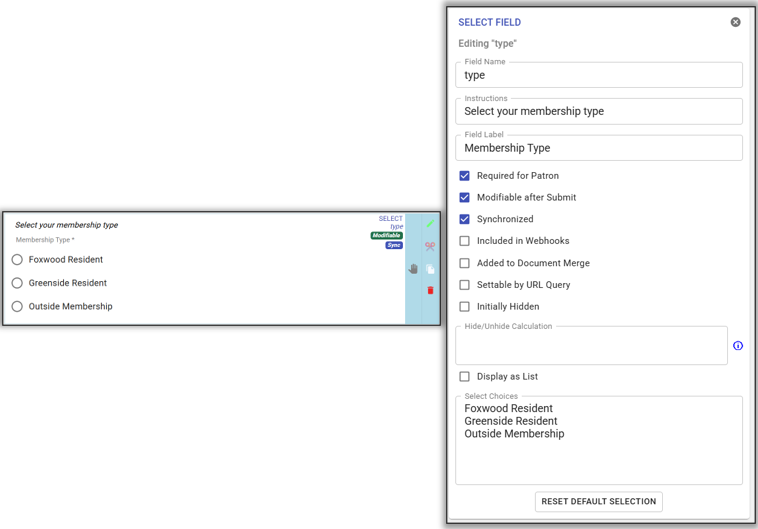
Most communities already have a SELECT FIELD called: type
Unhide, add, or adjust the field...
- Field Name: type
- Add instruction: Select your membership type
- Field Label: Membership Type
- Required for Patron: Checked
- Modifiable after Submit: Checked
- Synchronized: Checked
- Select Choices (Important: These must be the same exact choices as step 2)
- Foxwood Resident
- Greenside Resident
- Outside Membership
Step 8
Use a CALCRESULT FIELD field to display the membership fees.
Unhide, add, or adjust the field...
- Field Name: DisplayMembershipFeeTotal
- Field Label: Membership Fees: $
- Calculation Result Name: MembershipFeeTotal
- Decimal Places: 2
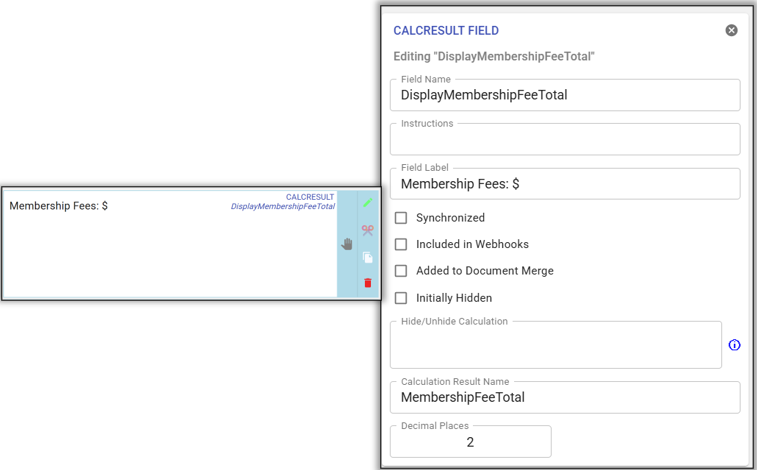
Note: Copy & Repeat Step 8 in your membership section, payment section, or as needed. This step is not critical, it simply shows the fees for your members so they know what they are paying.
GO TO: CALCULATIONS TAB
Step 9
Confirm, add, or adjust the calculation that creates an error message if the existing membership type (#APP_RNEW_MTYPE) is not a membership type listed on your application.
In this example, if a membership type is "Board Member". "Board Member" is not 1 of the 3 allowed membership types. This membership cannot be renewed.
- Result Name: MembershipTypeRenewErrorMessage
- Expression:
- This example uses 3 choices, use: #APP_IS_RNEW&&((#APP_RNEW_MTYPE != #MEMBER_TYPE_NAME_1)*(#APP_RNEW_MTYPE != #MEMBER_TYPE_NAME_2)*(#APP_RNEW_MTYPE != #MEMBER_TYPE_NAME_3))
- If you have 4 choices, use: #APP_IS_RNEW&&((#APP_RNEW_MTYPE != #MEMBER_TYPE_NAME_1)*(#APP_RNEW_MTYPE != #MEMBER_TYPE_NAME_2)*(#APP_RNEW_MTYPE != #MEMBER_TYPE_NAME_3)*(#APP_RNEW_MTYPE != #MEMBER_TYPE_NAME_4))
- If you have 5 choices, use: #APP_IS_RNEW&&((#APP_RNEW_MTYPE != #MEMBER_TYPE_NAME_1)*(#APP_RNEW_MTYPE != #MEMBER_TYPE_NAME_2)*(#APP_RNEW_MTYPE != #MEMBER_TYPE_NAME_3)*(#APP_RNEW_MTYPE != #MEMBER_TYPE_NAME_4)*(#APP_RNEW_MTYPE != #MEMBER_TYPE_NAME_5)
- Attribute: We're sorry. Something went wrong. You can not renew your membership. Please submit a new application. Error Type: Membership Type Mismatch.
GO TO: FORM TAB
Step 10
Most communities already have a RICHTEXTHTML FIELD called: RenewMembershipHelpText. This help text appears when the application is eligible for renew.
Add or adjust the field...
- Field Name: RenewMembershipHelpText
- Initially Hidden: Checked
- Hide/Unhide Calculation: #APP_IS_RNEW&&{MembershipTypeRenewErrorMessage}!=1
- Rich Text: Enter any text you wish. We recommend something simar to the below...