How to issue a REFUND for an event
Overview
If a patron purchases and pays for an event via Access Granted Systems, you can issue a refund.
Here is how
1. Go to the Events Page
2. Click on the Gear icon and Edit Signup Settings/Patrons
3. Click on the PATRONS tab
4. Click on the Gear icon and Refund
5. Click OK. You may issue a partial or full refund.
How to CONFIRM a refund was successful
To view the successful refund, you may have to wait a few seconds and refresh your browser. It should only take a few seconds.
Tip: If you wish to auto-refund cancelled bookings, enable Auto Refund in the service's settings
When you issue a refund, the journal feature will record when the refund was successful. You may have to refresh your browser but it should only take a few seconds.
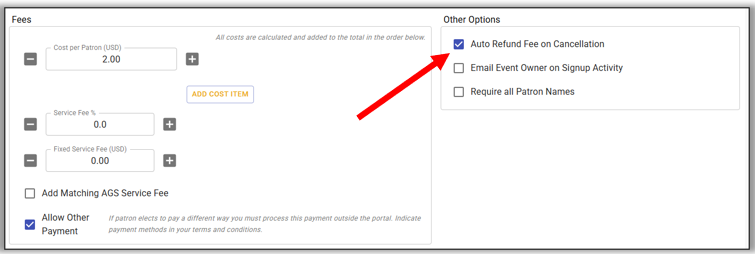 IMPORTANT! This auto-refund feature only auto-refunds if the patron cancels. If you (the admin or event owner) manually cancels the patron, you must also manually issue the refund.
IMPORTANT! This auto-refund feature only auto-refunds if the patron cancels.
If you (the admin or event owner) manually cancels the patron, you must also manually issue the refund.