How to sync fields with your database
Overview
One of the Application Portal's main purpose is to add and update Memberships in the check-in software's database. It's important to understand how this works and how it can be customized to fit your needs.
What fields sync?
The field must have the attribute Synchronized checked AND be one of the fields in the below tables.
For example, the telephone number's Filed Name in the application portal must be exactly "primaryPhone", case sensitive.
Membership Fields
Application Portal Field Name | Database Field | Default-Sync |
address | Address | Overwrite |
primaryPhone | Primary Phone | Overwrite |
secondaryPhone | Alternate Phone | Overwrite |
Overwrite | ||
emergencyContact | Emergency Contact | Overwrite |
notes | Notes (Membership Notes) | Keep |
custom1 | The 1st custom field | Overwrite |
custom2 | The 2nd custom field | Overwrite |
custom3 | The 3rd custom field | Overwrite |
custom4 | The 4th custom field | Overwrite |
custom5 | The 5th custom field | Overwrite |
Member Fields
Field Name | Database Field | Default-Sync |
patronsgroup | Must be synced (adds/updates member) | |
patrongroup | Must be synced (adds/updates member) | |
patronFirstName | First Name | Overwrite |
patronLastName | Last Name | Overwrite |
patronRelation | Relation | Overwrite |
patronBirthDate | Birthday | Overwrite |
patronImage | Image | Overwrite |
patronPrintPass | **The name must start with, "Classic", "Initial", "New", "Replacement", "Mail", "Card", or "Identification" to trigger pass printing. | See Below** |
Limited Member Fields
Field Name | Description | Default-Sync |
limitedpatronsgroup | Must be synced (adds/updates limited member) | |
limitedpatrongroup | Must be synced (adds/updates limited member) | |
limitedpatronFirstName | First Name | Overwrite |
limitedpatronLastName | Last Name | Overwrite |
limitedpatronRelation | Relation | Overwrite |
limitedpatronBirthDate | Birthday | Overwrite |
limitedpatronImage | Image | Overwrite |
limitedpatronPrintPass | ** The name must start with "Classic", "Initial", "New", "Replacement", "Mail", "Card", or "Identification" to trigger pass printing. | See Below** |
Example
The field emergencyContact will sync with the database's field Emergency Contact.
A Custom Field Example
The field custom1 will sync with the database's field Volunteer Choice because it is the 1st custom field. 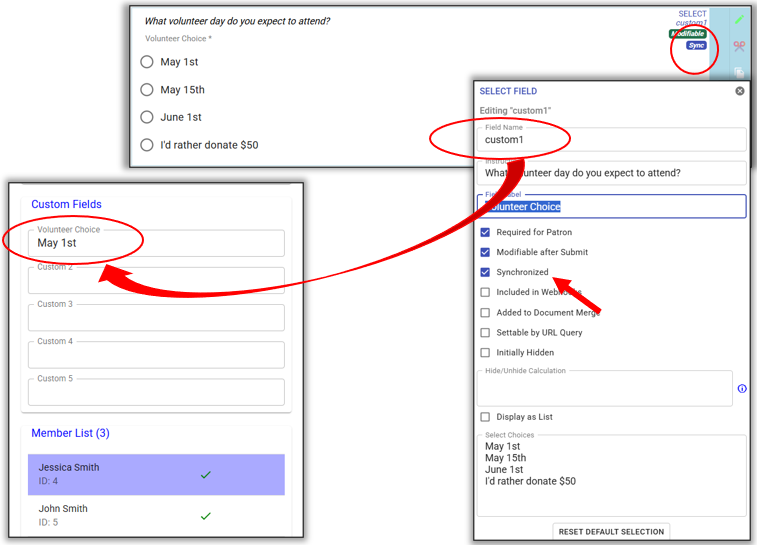
The field custom1 will sync with the database's field Volunteer Choice because it is the 1st custom field.
What is Default-Sync?
During the syncing process, the field's default setting will be to overwrite the data. This way the old data will be deleted and your database will populate with the newest data. The processor can edit the application or decide to keep the old data during the syncing process as needed.
If you would like a field not to sync, uncheck the field during the syncing process.
In the above example...
- By default, the old Emergency Contact is deleted and the new Emergency Contact is added and updated.
- The processor unchecked Email, now the old Email is kept and the new Email is ignored and not added.
Exceptions
- Membership Notes: By default the old membership notes are kept. The syncing field is unchecked by default. You must manually check the box to update.
- Pass Printing: patronPrintPass & limitedpatronPrintPass are special syncing fields. If these field's value starts with "Classic", "Initial", "New", "Replacement", "Mail", "Card", or "Identification", pass printing checkbox will be checked. Otherwise, the pass printing checkbox will be uncheck. Either way, the processor can check/uncheck this box as needed.